Overview
When a safety-critical checklist item fails, the machine stays locked — that's the platform doing its job. But a failed machine sometimes still has to physically move: into a workshop bay, off a ramp, away from a hazard. PreStartGo's answer is a controlled bypass — never a workaround: always deliberate and always time-limited. The in-app bypass is also attributed and logged; the button on the device is not (below).
Note
PreStartGo doesn't claim "no overrides". A bypass path always exists so a machine is never truly stranded. An in-app bypass is recorded against the person who made it, with their reason, and escalated to the people responsible for following up. The button on the device is the exception: PreStartGo never receives a record of it.
When a critical item fails
After you add the defect details and submit a failed check:
- The check records as Fail and the critical defect is raised automatically.
- No unlock happens. The Interlock's LED stays solid red, and the result screen has no unlock step.
- Your supervisors are notified of the failed check.
- A "Bypass to move for repair" button appears on the result screen — on machines with an Interlock fitted. (A GoTag-only machine was never electrically locked, so there is nothing to bypass.)
- The machine stays locked until the defect is closed: every later pre-start on it fails too, and each failed pre-start offers the same bypass.
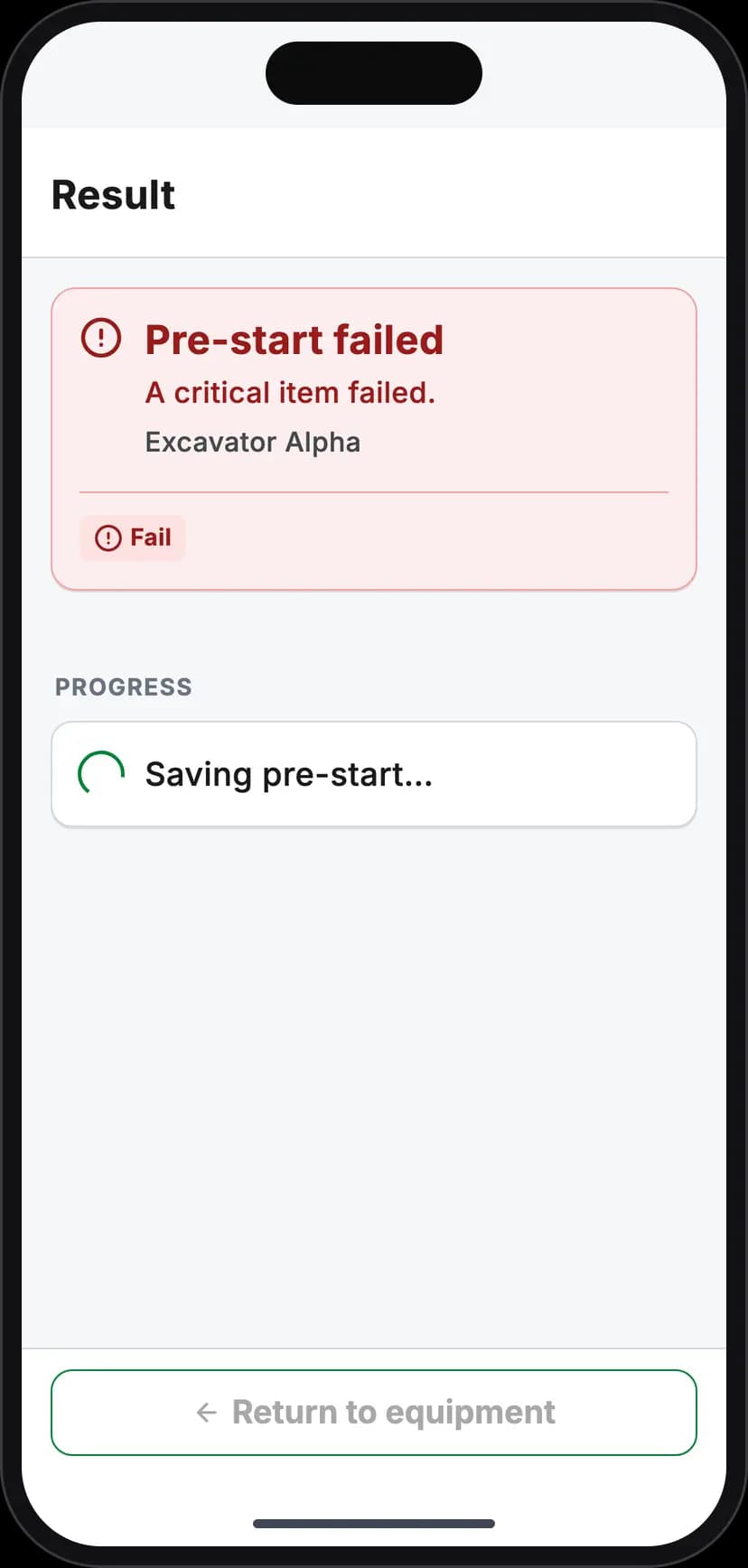
The result screen while a failed check submits: no unlock step
Using the in-app bypass
- 1Tap "Bypass to move for repair" on the result screen.
- 2
Enter a clear justification — "Moving to workshop for seatbelt repair". The field is required; the bypass cannot be submitted blank.
- 3
Tap Submit bypass. The app records the bypass, then sends the Interlock a time-limited unlock. The machine can now be moved.
The bypass window is bounded — long enough to move a machine, not long enough to work a shift on it. When it lapses, the interlock re-engages (which, as always, cannot stop a running engine — it prevents the next start).
What the bypass does not do: clear the machine or the defect. The critical defect stays open and keeps the machine locked: every pre-start on it fails until the defect is closed after repair, and normal operation then needs a fresh, passing pre-start — see Defect Management Workflow.
The button on the device
There is a second, last-resort path that needs no phone at all: holding the mode button on the Interlock itself for a full 10 seconds toggles a bypass directly on the device. It exists for the genuine emergency — no phone, no app, no signal, machine must move now.
It is not as accountable as the app path, and that is the price of needing nothing:
- It records no person, no reason and no place. The Interlock keeps a note of it on the device itself, but PreStartGo never collects that note: the button bypass appears in no console page, report or audit log.
- It's time-limited (three hours), ends on any power cycle, and ends the moment any phone connects.
- Your organisation can disable the button entirely per device, if policy says the app path is the only acceptable one.
A machine in bypass shows a solid amber LED — deliberately the same colour family as service mode: intentional, and temporary.
Bypass vs service mode
Don't reach for bypass when the real situation is planned maintenance. Bypass is the emergency exit — quick, bounded, minimal ceremony. Service mode is the deliberate maintenance state a Supervisor or Technician puts a machine into, which survives power cycles and lasts until explicitly ended — see Using Service Mode for Repairs.
Edge cases
- Offline — the in-app bypass works offline like everything else: the justification queues, and the app re-checks your authority at the moment of the bypass. The record lands when coverage returns.
- Who sees it — in-app bypasses are visible to your organisation's supervisors and managers, and feed the Bypass Events report. Each one also notifies the machine owner's Administrators and Account Owner as it happens. The button on the device shows in neither.
- Repeated bypassing is exactly the pattern the reporting exists to surface — expect questions. That's the design.
- A technician's Out of Service lockout is different from the lock a failed critical item leaves: it refuses the app's unlock, bypass included, until a Technician or Lead, or an Administrator in the console, lifts it. The button on the device, where it's enabled, is the remaining way to move the machine.
Troubleshooting
| Symptom | Likely cause | What to do |
|---|---|---|
| No bypass button on the result screen | The machine has no Interlock, or the check didn't fail | Tag-only machines have nothing to bypass; the button renders only after a failed submit |
| "Not licensed" instead of the bypass button | Your licence for this group lapsed mid-flow | Renew the licence — the app re-checks authority at the moment of the bypass |
| Submit disabled | The justification field is empty | Enter a clear reason — it's required |
| Device button hold does nothing | The button bypass is disabled by policy, or the hold was under 10 seconds | Use the in-app path, or hold for the full 10 seconds |
| Machine re-locked mid-move | The bypass window lapsed | Run the bypass again — and plan the move within the window |
| Bypass saved, but the machine didn't unlock | A Technician has marked a defect on it Out of Service | Have a Technician or Lead, or an Administrator in the console, lift the lockout, or use the button on the device |